Monday, December 7, 2015

MVC vs. MVP

Extracted from Microsoft Composite UI Applicatino Block Help pages.
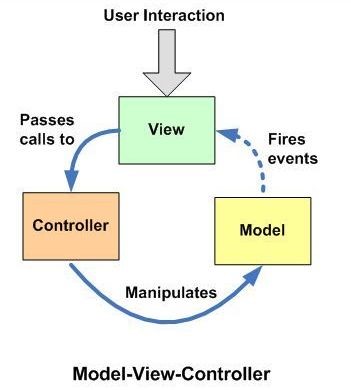
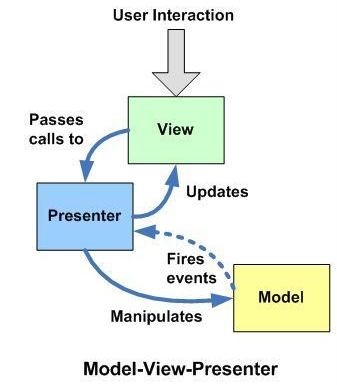
The two most common patterns are Model-View-Controller (MVC) and
Model-View-Presenter (MVP). Both models are equally valid, though the MVP model
is generally easier to implement. MVC requires events that are exposed from the
model to update the view, whereas MVP depends on the presenter to update the
view directly.
12
Some notes on MVC:
MVC is a fundamental design pattern for the separation of user interface
logic from business logic. The pattern separates the modeling of the application
domain, the presentation of the application, and the actions based on user input
into three distinct objects:
  • Model. These objects know all about the data displayed, and are
    responsible for managing the data of the application. For example, you can think
    of your business entity classes as the “model” in business applications.
  • View. These objects manage the information displayed to users.
    Multiple views can display the same information in different ways.
  • Controller. These objects allow the user to interact with the
    application. Views invoke the appropriate controller, which acts on the model.

By Unknown with No comments

If you *must* use .NET System.IO.Ports.SerialPort

Microsoft .NET FrameworkAs an embedded developer who writes desktop software mostly for configuration of, and data download from, peripheral devices, I use serial data streams a lot.  Mostly USB virtual serial posts from FTDI, but also the USB Communication Device Class and real 16550-compatible UARTs on the PCI bus.  Since looking at data through an in-circuit emulator debug interface is generally a miserable experience, getting serial data communication with a custom PC application is essential to analyzing data quality and providing feedback on hardware designs. C# and the .NET Framework provide a rapid application development that is ideal for early development that needs to track changing requirements as hardware designs evolve.  Ideal in most respects, I should say.
The System.IO.Ports.SerialPort class which ships with .NET is a glaring exception.  To put it mildly, it was designed by computer scientists operating far outside their area of core competence.  They neither understood the characteristics of serial communication, nor common use cases, and it shows.  Nor could it have been tested in any real world scenario prior to shipping, without finding flaws that litter both the documented interface and the undocumented behavior and make reliable communication usingSystem.IO.Ports.SerialPort (henceforth IOPSP) a real nightmare.  (Plenty of evidence on StackOverflow attests to this, from devices that work in Hyperterminal but not .NET because IOPSP makes setting certain parameters mandatory, although they aren’t applicable to virtual ports, and closes the port on failure.  There’s no way to bypass or ignore failure of these settings during IOPSP initialization.)

What’s even more astonishing is that this level of failure occurred when the underlying kernel32.dll APIs are immensely better (I’ve used the WinAPI before working with .NET, and still do when I want to use a function that .NET doesn’t have a wrapper for, which notably includes device enumeration).  The .NET engineers not only failed to devise a reasonable interface, they chose to disregard the WinAPI design which was very mature, nor did they learn from two decades of kernel team experience with serial ports.
A future series of posts will present the design and implementation of a rational serial port interface built upon, and preserving the style of, the WinAPI serial port functions.  It fits seamlessly into the .NET event dispatch model, and multiple coworkers have expressed that it’s exactly how they want a serial-port class to work.  But I realize that external circumstances sometimes prohibit using a C++/CLI mixed-mode assembly.  The C++/CLI solution is incompatible with:
  • Partial trust (not really a factor, since IOPSP’s Open method also demands UnmanagedCode permission)
  • Single-executable deployment (there may be workarounds involving ILMerge or using netmodules to link the C# code into the C++/CLI assembly)
  • Development policies that prohibit third-party projects
  • .NET Compact Framework (no support for mixed-mode assemblies)
The public license (as yet undetermined) might also present a problem for some users.
Or maybe you are responsible for improving IOPSP code that is already written, and the project decision-maker isn’t ready to switch horses.  (This is not a good decision, the headaches IOPSP will cause in future maintenance far outweigh the effort of switching, and you’ll end up switching in the end to get around the unfixable bugs.)
So, if you fall into one of these categories and using the Base Class Library is mandatory, you don’t have to suffer the worst of the nightmare.  There are some parts of IOPSP that are a lot less broken that the others, but that you’ll never find in MSDN samples.  (Unsurprisingly, these correspond to where the .NET wrapper is thinnest.)  That isn’t to say that all the bugs can be worked around, but if you’re lucky enough to have hardware that doesn’t trigger them, you can get IOPSP to work reliably in limited ways that cover most usage.
I planned to start with some guidance on how to recognize broken IOPSP code that needs to be reworked, and thought of giving you a list of members that should not be used, ever.  But that list would be several pages long, so instead I’ll list just the most egregious ones and also the ones that are safe.
The worst offending System.IO.Ports.SerialPort members, ones that not only should not be used but are signs of a deep code smell and the need to rearchitect all IOPSP usage:
  • The DataReceived event (100% redundant, also completely unreliable)
  • The BytesToRead property (completely unreliable)
  • The ReadReadExistingReadLine methods (handle errors completely wrong, and are synchronous)
  • The PinChanged event (delivered out of order with respect to every interesting thing you might want to know about it)
Members that are safe to use:
  • The mode properties: BaudRateDataBitsParityStopBits, but only before opening the port. And only for standard baud rates.
  • Hardware handshaking control: the Handshake property
  • Port selection: constructors, PortName property, Open method, IsOpen property, GetPortNamesmethod
And the one member that no one uses because MSDN gives no example, but is absolutely essential to your sanity:
  • The BaseStream property
The only serial port read approaches that work correctly are accessed via BaseStream.  Its implementation, the System.IO.Ports.SerialStream class (which has internal visibility; you can only use it via Stream virtual methods) is also home to the few lines of code which I wouldn’t choose to rewrite.
Finally, some code.
Here’s the (wrong) way the examples show to receive data:
port.DataReceived += port_DataReceived;

// (later, in DataReceived event)
try {
    byte[] buffer = new byte[port.BytesToRead];
    port.Read(buffer, 0, buffer.Length);
    raiseAppSerialDataEvent(buffer);
}
catch (IOException exc) {
    handleAppSerialError(exc);
}
Here’s the right approach, which matches the way the underlying Win32 API is intended to be used:
byte[] buffer = new byte[blockLimit];
Action kickoffRead = null;
kickoffRead = delegate {
    port.BaseStream.BeginRead(buffer, 0, buffer.Length, delegate (IAsyncResult ar) {
        try {
            int actualLength = port.BaseStream.EndRead(ar);
            byte[] received = new byte[actualLength];
            Buffer.BlockCopy(buffer, 0, received, 0, actualLength);
            raiseAppSerialDataEvent(received);
        }
        catch (IOException exc) {
            handleAppSerialError(exc);
        }
        kickoffRead();
    }, null);
};
kickoffRead();
It looks like a little bit more, and more complex code, but it results in far fewer p/invoke calls, and doesn’t suffer from the unreliability of the BytesToRead property.  (Yes, the BytesToRead version can be adjusted to handle partial reads and bytes that arrive between inspecting BytesToRead and calling Read, but those are only the most obvious problems.)
Starting in .NET 4.5, you can instead call ReadAsync on the BaseStream object, which calls BeginReadand EndRead internally.
Calling the Win32 API directly we would be able to streamline this even more, for example by reusing a kernel event handle instead of creating a new one for each block.  We’ll look at that issue and many more in future posts exploring the C++/CLI replacement.

By Unknown with No comments

Sunday, November 29, 2015

C# Async Await Cheatsheet

C# Async Await Cheatsheet


     Asynchronous programming is difficult. Fortunately, C# has all the wonders of the Task Parallel Library to help us out. However, there is still a need to understand what properties we get with an async function definition, or what kind of properties we get when awaiting a task versus calling .Wait(). Knowing the properties will leave us better prepared to make decisions around which method we wish to use. So I made a little async await cheat sheet to help remember the properties of the different task scenarios. Enjoy~

A pdf version to take along with you can be found here.


o    Task Usage:

         Task<int> longTask = LongRunningCalculation()
  Task starts immediately.
  Runs to first await in LongRunningCalculation() on current thread.
  Returned Task<int> can be passed around to be awaited in the future.

         await longTask
  Does not block current thread.
  Unwraps Task<int> into int.
  Throws first exception that is triggered.

         longTask.Wait()
  Blocks current thread until longTask has completed.
  Throws AggregateException which needs to be unwrapped to find triggered exception.

         longTask.Wait(Timespan.FromSeconds(5))
  Blocks current thread until longTask has completed or the timeout has occurred.
  Throws AggregateException which needs to be unwrapped to find triggered exception.
  Returns true when longTask ran to completion, and false when longTask timed out.
  longTask may still be running even after the timeout.

         longTask.Result
  Blocks current thread until longTask has completed.
  Unwraps Task<int> into int.
  Throws AggregateException which needs to be unwrapped to find triggered exception.

         longTask.GetAwaiter().GetResult()
  Blocks current thread until longTask has completed.
  Unwraps Task<int> into int.
  Throws first exception that is triggered.

o    Batch Task Usage:

         Task<int>[] longTasks =
{ LongRunningCalculation(), LongRunningCalculation(), LongRunningCalculation() }
  All tasks start immediately.
  All tasks run to first await in each LongRunningCalculation() on current thread.

         Task.WhenAll(longTasks)
  Batches up all of longTasks into a single awaitable task.
  Runs all of longTasks in parallel when scheduling permits.
  Returned Task<int[]> can be passed around to be awaited in the future.

         await Task.WhenAll(longTasks)
  Does not block current thread.
  Unwraps Task<int[]> into int[].
  Finishes running all tasks before any exception is thrown.
  Throws first exception that is triggered.

         Task.WaitAll(longTasks)
  Blocks current thread until all longTasks have completed.
  Finishes running all tasks before any exception is thrown.
  Throws AggregateException which needs to be unwrapped to find triggered exception.

         Task.WaitAll(longTasks, Timespan.FromSeconds(5))
  Blocks current thread until all longTasks have completed or the timeout has occurred.
  Finishes running all tasks before exception is thrown.
  Throws AggregateException which needs to be unwrapped to find triggered exception.
  Returns true when longTasks all ran to completion, and false when longTasks timed out.
  longTasks may still be running even after the timeout.
o    Configuring Task Await Options:

         await longTask.ConfigureAwait(false)
  Configures the task to not need to return to the synchronization context it was originally invoked with. The context is usually the thread it was invoked on.
  Lowers chance of deadlocks and should be preferred.

         await longTask.ConfigureAwait(true)
  Configures the task to need to return to the synchronization context it was originally invoked with. The context is usually the thread it was invoked on.
  This is the default for awaited tasks without calling .ConfigureAwait().
  Usually used when modifying UI elements that need to occur on the UI thread.

o    Function Definitions:

         int Method()
  Method can internally contain Tasks.
  Method can internally .Wait() Tasks.
  Method cannot internally await Tasks.
  Method can return int.
  Method cannot be awaited on externally.
  Can externally catch exceptions thrown by Method.

         Task<int> Method()
  Method can internally contain Tasks.
  Method can internally .Wait() Tasks.
  Method cannot internally await Tasks.
  Method can return Task<int>.
  Method can be awaited on externally.
  Can externally catch exceptions thrown by Method when awaited.

         async Task<int> Method()
  Method can internally contain Tasks.
  Method can internally .Wait() Tasks.
  Method can internally await Tasks.
  Method can return int.
  Method can be awaited on externally.
  Can externally catch exceptions thrown by Method when awaited.

         Task Method()
  Method can internally contain Tasks.
  Method can internally .Wait() Tasks.
  Method cannot internally await Tasks.
  Method can return Task.
  Method can be awaited on externally.
  Can externally catch exceptions thrown by Method when awaited.

         async Task Method()
  Method can internally contain Tasks.
  Method can internally .Wait() Tasks.
  Method can internally await Tasks.
  Method cannot return anything.
  Method can be awaited on externally.
  Can externally catch exceptions thrown by Method when awaited.

         async void Method()
  Method can internally contain Tasks.
  Method can internally .Wait() Tasks.
  Method can internally await Tasks.
  Method cannot return anything.
  Method cannot be awaited on externally.
  Cannot externally catch exceptions thrown by Method.
  Usually used as an async event delegate function definition, any other situation should use async Task or async Task<T>.
By Unknown with No comments